
More systems!
Let's get you set up and revved up!

Hello darlings!
Happy mid-July! I hope you are all living your best summer lives!
Last week, I introduced the idea that we should use systems to routinize hard / annoying /difficult / time consuming parts of our lives. We started with three: focus, inbox management, and syllabus set up.

The goal of setting up these systems is not for you to spend a bunch of time on ‘productive procrastination’ (aka what if I spend a lot of time reading about other people filter their email but never do it myself but this will make me feel better about not make any progress on a book manuscript). It is also not for you to feel bad about yourself because you can’t focus for 20 hours straight and write an article in 30 minutes and never forget an email (this person doesn’t exist).
The goal is for you to spend a little time now that will save you time / attention / energy / focus later. If you set up a focus system that automatically turns on at 8am or 9:25am or 2pm or 7pm or whatever your ideal writing time is, then you can spend 8am or 9:25am or 2pm or 7pm or whatever thinking about the fucking writing, not about the system or distracted by that shiny email that came in. If you filter your emails, this means you can check your email quickly to see if a coauthor has written and won’t get sucked into a quagmire of bullshit. Setting up your syllabus system means that you save time on each class but also that you aren’t embarrassed by 2023 submission dates or broken links and you don’t have to reinvent the wheel every single stupid semester.
What do we have going on this week? Today, I have two systems for you! (I was hoping for three, but didn’t get it together!)
System 1 (end of the day / start of tomorrow) helps you set up a daily system (daily systems are HARD) to close out the day and get ready for tomorrow. The goal here is for you to set yourself up to STOP FUCKING WORKING at the end of the day and to start each day with a clear idea of what you should be working on and why. This requires some commitment to set up!
System 2 (website / social refresh) is an annual or biannual effort to make sure that your website and social media profiles are up to date, accurate, and safe. This will require a little investment of time right now but will not need to be revisited anytime soon.
Also note - I’m working on these systems side by side w you! I have a LinkedIn profile picture from 2012! My desk is a mess! Let’s win together!!
As usual, these are also available in the google doc where I’m keeping track of all my systems (and maybe updating things on the sly heheheh).
Good luck bebes
XOXOX
Mirya
End of the work day system:
One of the weirdest parts of academic life is that our job is never done. Like, never? Even if you send off the book that you’ve been working for 10 years, there’s still a review to do and oh what’s the next project and remember that conference paper that is good but not great but COULD be great if you just spent the rest of your life on it? As a consequence, we face two challenges:
- Ending work so we can get some fucking *rest*
- Starting work up again without reinventing the wheel each day
Here’s how to create a system that helps you with both of these goals.
Goal: create a system that helps you stop work at the end of the day and continue your work in the next day in a (relatively) seamless manner
Step 1: Figure out how to stop
Send all drafted emails
Get them out in the world, even if you aren’t sure they are perfect. This includes slack messages, texts to coauthors, etc.
Or schedule send them for midmorning* tomorrow
*if it is an email where I will need to respond to the response, I don’t want it to come in right first thing as then I’ll feel like I have to respond. But a 10:30 am email? Perfect. If it is just – I need to send this – I just send it or I schedule it to be sent at 7am.
Turn off all distracting notifications
This can include email or calendars that you don’t control so you won’t be tempted to work tonight and will start tomorrow without interruptions. This could be as simple as turning on a well calibrated do not disturb (more on this in a later system!) or turning specific notifications off. Forever. Never again. 😊
Shut down your email
This makes sure it is NOT OPEN when you start work tomorrow.
Step 2: Figure out how to start (next time):
Spend 5 minutes figuring out next steps for your open projects
These can even just the next step! What do you want to do next for every project that you worked on for the day and / or every project open at the end of the day. I like to have three concrete next steps outlined (I say I LIKE to, not that I do!)
This can be as simple as “start on line 149 in code” or “read Terriquez 2012” something like “Keep working on the lit review for R&R. Start with Chicago post suffrage.” This can be located in a central location, i.e., a document called “tomorrow’s plans” or in the document that you are working on or as a task on your calendar. Whatever works for you!
Then:
Close / save all documents, datasets, code.
Please don’t leave unsaved or open documents on your computer overnight!
Close all stale tabs.
Yes, I know that those are your emotional support tabs. You can move on. Keeping that one journal article open that you have started five times and never finish isn’t helping anyone. Close it out. You can save it to your citation management system if it makes you happy!
1 minute tidying your desk
Spend a minimum amount of time quickly tidying your desk, including putting your water class or bottle away, throwing away today’s post-its, closing and shelving books, etc. This might take you no time at all if you are all digital or lots of time if you are analogue.
Step 3: Count your wins and walk away
Here, we want to mentally, physically, and digitally finish the day in a way that creates distance from the work and lets you move on from the day.
Spend 3-5 minutes writing your wins / progress for the day.
This could be in a Slack Canvas, a google keep doc, a text doc, whatever! You could write in a physical notebook!
Say an end of the day manta
Cal Newport says “system shutdown, complete.” I say “Enough.” You might want something else. But I highly recommend instituting some kind of marker of the end of the day.
Log out of your computer
Make it harder for you to just jump back into something
Physically separate yourself from your work
This mean moving your ass away from your desk or out from under your laptop and WALKING AWAY. Do this even if your next thing is to open your laptop and start playing a game or if your office is your living room. Make physical distance from yourself immediately after you finish your end of the day ritual.
What also works for me: physically moving myself after my work. This has included (at various points in my life): walking home, working out in the late afternoon / early evening, an afternoon dog walk, walking to the grocery store, exercise classes after work.
Step 4: Practice practice practice, refine, practice
Like all our systems, you need to make this your own! But you also need to give a fucking chance. So – can you try to implement this for 2 solid weeks of work? And then refine parts that don’t work for you? Maybe you hate closing the tabs. Cool! Don’t do that! Maybe you love the mantra but not the desk tidying. Great, pick what works and what doesn’t. Like all habits, we need to work on this, so maybe the thing to do is to put the end of the day ritual on your calendar or print out a check list like below (also available on the google drive archive of systems if you want to make it your own)
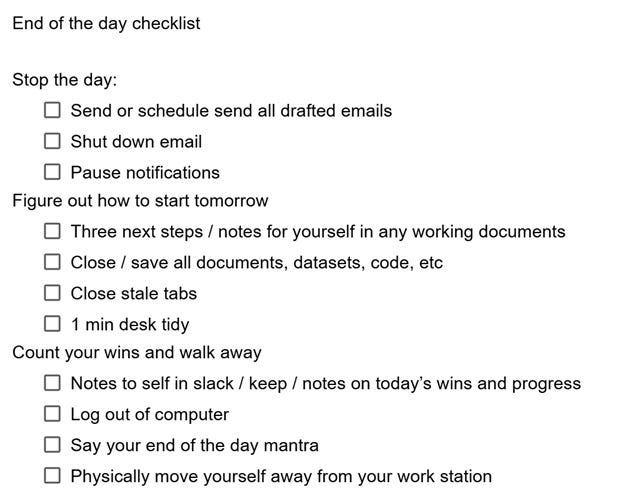
If you think for some reason that I do all of this everyday, uh nope! I fucking WISH! So I’m going to give it a go over the next few weeks. To facilitate that, I put “close out day” as a 20 minute appt on my calendar before my workout block!
Website and social media refresh:
Hey babes, when was the last time you updated your website? Or the pictures and bio on social media sites? Um hmmm. Let’s do it and then let’s set a reminder to do this again next year around now!
Note – if you don’t have any of these or don’t want to update them, just skip the step my bebe. No one cares if your profile picture on your website is from 1999.
Step 1: Figure out your accounts
Here are the accounts you may have:
Website
Facebook / Instagram / Threads (Meta one log in)
Google Scholar (yes I count this as social media! And yes it needs to be checked!)
X/Mastodon/Bluesky
Step 2: Get in
Track down the log in information
You should do this for all of the websites and social media sites that you control. This includes sites that you have that you do not use (i.e., if you have a linkedin profile but you have not updated it in 10 years, you still should be able to log into it!)
Protect your accounts.
Log in and set up 2 factor or password manager for all your accounts. Please.
If you are truly committed to not using a website again (i.e., you quit X), please empty out your account or (even better) delete the whole thing.
Step 2: Pick photos
Ideally, all the sites where people would look for you would have a relatively recent, friendly photo of you. Maybe you want to unify photos across all the sites. Maybe you want to vary them. But this is a chance for you to update from older photos.
You could also take this as a chance to schedule (if it exists) new headshots with your school or university photographer. Or maybe you just ask a friend to take some photos of you in good light wearing your favorite outfit.
Step 3: Make it easy for people to see the basics.
Website: if you have a website as an academic, POST A FUCKING UP TO DATE CV*
*note — in writing this, I realized that I had both an out of date title on my website AND an out of date CV so…
To do so, please set up a system where the website posts from a file that you regularly save over / refresh. I use Google Sites + save over a file on google drive. You could easily do the same with dropbox. Whatever it is, have a fucking up to date CV.
Social media: Look at what people see if they are strangers looking at your profile (and change this if wanted)
If you don’t regularly use it, that’s fine. Just know that people will look you up on and might see that your last post was some inside joke about Russian goats or something and… that’s weird. So I’d suggest you delete posts until one that is reasonable for a static post is there or pin a post that is a good example of who you are. If you are intermittently active, you might even post that or note it in your bio.
Step 4: Decide what else you want to post
Maybe you want a narrative on your website. Cool. Write it and then edit it and then put a reminder in a year to update it. Maybe you want to link to your cool hobbies. Great, set it up. Maybe you want it to just link to your CV. Also cool. Maybe you want to add a link to help people fund your favorite charity or say your name.
Figure out whatever pithy / snarky / serious thing you want your bio for each of these websites to say and update it. Or maybe you are happy with your Instagram profile saying “all gas no breaks”! (true story).
Maybe you want something that looks really professional! Great, there’s like 1000 sites out there about how to update your LinkedIn profile.
Step 5: Take out the old shit
Run a broken link checker
Delete pages of your website that no longer apply.
Like, *delete* delete them.
Step 6: (scary): See what they see
Log into incognito mode and google yourself.
Are you happy with what pops up? Is it any of your personal info that you don’t want out there? You might consider using DeleteMe (referral code) or a similar website
Expert level, Step 7: Figure out how to update your bio, cv or photo on your university’s website
May the goddess bless you in this fight.